Think about your last twelve months as a nonprofit professional. What new information did you learn? What unique problems did you encounter? Now think about where you found that information and the answers to those problems. When it comes to answering your questions as a nonprofit professional, using search engines like Google is a fast and effective way to find information.
When the world presented a challenge, nonprofit professionals turned to Google for solutions. If you're like thousands of other professionals, you likely searched for virtual fundraising last year after the COVID-19 pandemic forced nonprofits to cancel in-person events. In fact, three of the highest trending searches were virtual fundraising, virtual fundraising ideas, and virtual fundraising events.
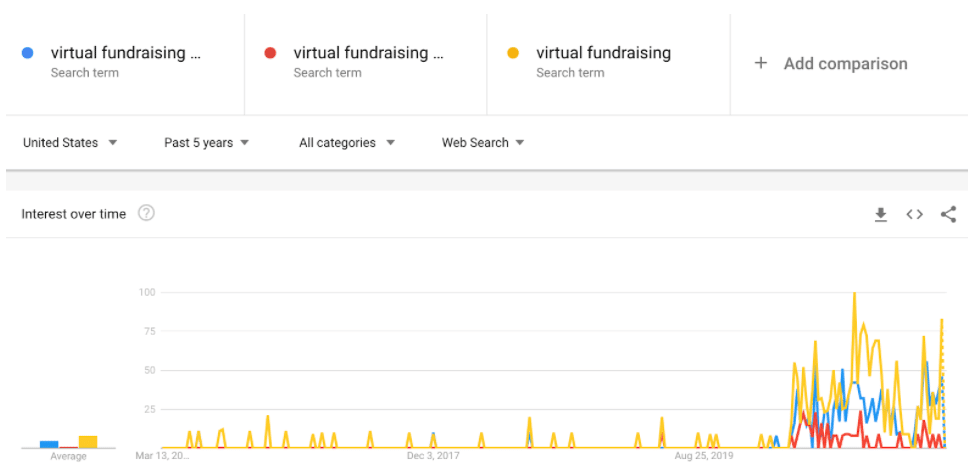
Source: Google TrendsYou aren't the only one typing in random questions into Google. Your potential supporters, participants, and beneficiaries are too. With the right strategy and approach, you can help your future supporters find the answers and solutions that your organization provides.
In this blog post, we'll show you how to use search engines to grow your reach online with a practice called search engine optimization (SEO).
SEO for nonprofits is a marketing strategy that connects potential supporters and beneficiaries with your organization's solution. Laid out in simpler language, by using certain words on your website, you can appear in people's search engine queries. Why is that important? By turning up in people's searches, they're more likely to learn more about your organization and turn into a supporter or donor.
Nonprofit SEO is a digital marketing strategy like digital advertising, email marketing, or social media marketing. It's unique from other channels because it's organic, meaning you don't directly pay for it. If you want to pay to get on Google, read more about the Google Ad Grant.
When it comes to SEO, your website is the hub. The internet is the connector. Search engines are the vehicles that get your audience to your website where they can learn about your organization's mission and where they can subscribe, donate, or complete another call to action, known as a "conversion."There are at least two unique audiences you're looking for:
Not only do you want to help potential supporters, beneficiaries, and participants to find your nonprofit, but you also want to make their experience on your website as good as possible. Nonprofit SEO will help you improve your website overall in several areas:
If you want to make your website more user friendly, relevant, and authoritative and build up a steady stream of free traffic, now's the time to invest in SEO. Here are some beginner steps to start getting the benefits of SEO for your nonprofit website.
First, it's important to check your website analytics tools. These systems track your website discovery and engagement. There are a lot of tools out there, but the three we recommend setting up right away are Google Analytics, Google Search Console, and Bing Webmaster Tools. If you're using a website builder like Squarespace, Wix, or Mailchimp, you'll likely have analytics tools already built in.
How do tracking and analytics help SEO? Though collecting data doesn't directly improve SEO, it does provide insights you'll need to strategize and track your progress. For example:
These metrics will give you an idea of your online presence today. You can also use them to set your goals for growth.
When you're optimizing your website for search engines, you'll want to ask, "What are my potential supporters searching for?" There will be a broad range of words and phrases that people will type into Google in hopes of finding answers that your organization can provide.
Take an animal adoption agency for example. What kind of questions or phrases would you search for if you were thinking of adopting a dog? Some examples might be:
This progression of searches is what's known as the searcher's journey. You might not search all of these things in one sitting, but you likely will over the period of time when you're considering adopting a dog.
Try this exercise for your organization. Think about potential donors, supporters, or beneficiaries. What might they be looking for that your organization can provide? Make a list like the animal adoption example.
One you have some ideas, you can find real data to see how many searches, if any, each phrase on your list gets per month. The easiest way to do this is to log into your Google Ads account. Under Tools & Settings, there's a tool called Keyword Planner. Go to Keyword Planner, click on Discover New Keywords, and type in up to ten of the examples you jotted down on your list. Then click Get Results.
Now you'll be able to see how many people search for your phrases per month. Let's see the animal adoption organization example.

There was only one search on the list that didn't have any search volume. That means we can scratch it off the list since it's not relevant. The most searched phrases were "where to adopt dogs," "how much does it cost to adopt a dog," and "what are the best dog breeds." Take note of these popular search phrases because they'll come in handy later.
One other feature of your results on Keyword Planner is the Keyword Ideas section. If you scroll down past the Keywords You Provided section, you'll see a long list of other relevant keywords that weren't on your list.
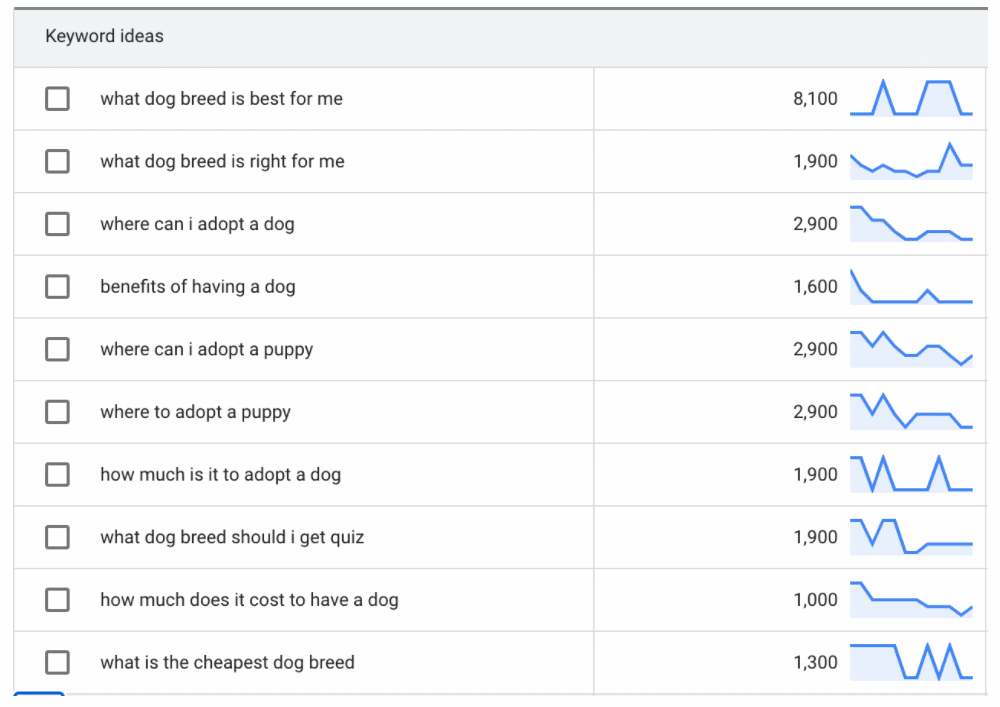
Once you start sorting through your keyword ideas, your list will likely start to get a little bit long. We recommend checking off the keywords that seem most relevant to your organization and exporting them to Google Sheets. From there, you'll be able to organize them more.
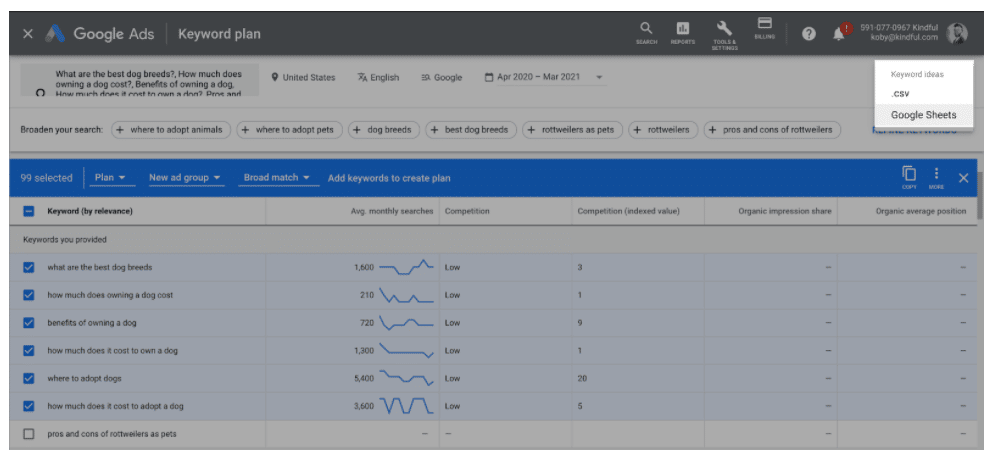
Now that you have a list of words and phrases that your potential supporters are looking for, what's next?
Once you export your keywords to Google Sheets, don't be overwhelmed by everything you see. The only columns you need to keep now are keyword and average monthly search volume. From there, we recommend adding a pillar column to help organize the list.
The goal of organizing your keyword list is to group them together based on similarity. Think about what categories you can use to sort your list. For the animal adoption organization, one commonality is cost. To find all the keywords related to cost, you can use the filter function on Google Sheets and search by that word. In this example, we're going to also filter by search volumes that are higher than 99 to help narrow down the list. That leaves us with a dozen or so keywords that are related to cost.

Now turn off your filter and categorize as many of the words as you can. We narrowed down the animal adoption list to six pillars: benefits, breed, care, choosing, cost, and location. If you want, you could continue to organize your list with subcategories, but we'll leave it at pillars for now.
Now that you have a long list of keywords related to your organization, let's talk about how to use it.
The next action step in optimizing your website is to use your keyword list to create a content strategy. This means we'll take the information you have from your keywords and use it to try and get your website to show up in search results.
Go ahead and add another column to your spreadsheet that says Content. You'll use this column to jot down what pages, if any, on your website relate to each keyword. If you don't have one, now's a good time to create one! You don't have to do this for every keyword. For now, just start with each pillar.
For the animal adoption organization, let's say they already had pages onWhy Adopt An Animaland Choosing Your New Companion. Those pages would fit perfectly with the benefits and breed pillars. Now they can revisit these pages and optimize them.
Think about your website. What can you improve on the page? Can you use some of the information from your keyword spreadsheet to make the content even better?
In this example, if the organization didn't have a section on theirWhy Adopt page on the health benefits of owning a dog, we'd recommend adding that section. With your website, use the information about what people are searching to make your pages even better. Make sure to check the overall quality of the page too.
Here are some things to look at:
You can also use your list to get new content ideas. Let's say they don't have a Cost page yet. This is a great opportunity to create a new page with a calculator to help potential adopters understand how much it would cost them to have a pet.
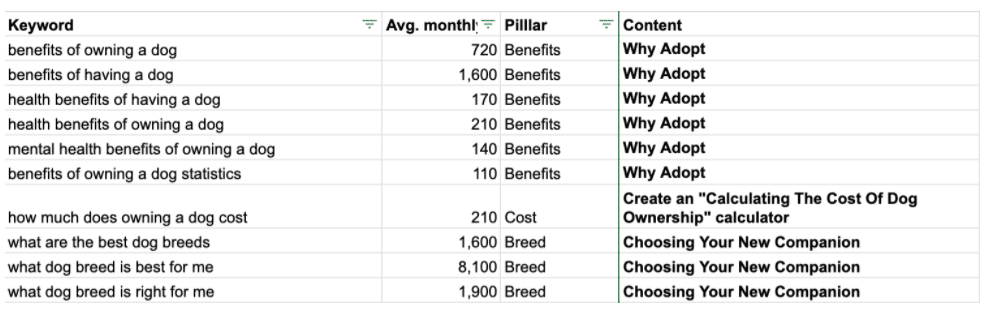
Take your time, and keep this list handy as you continue improving your website. You don't have to do it all in one day. This will be a guide to improving your website over the next few months.
These steps will move your organization's website in the right direction. There are several other areas of SEO to consider too. There's technical SEO, off-page SEO, and local SEO. But the most important thing is that you're focused on providing unique, high quality, and relevant content for your audience. The more content you create, the better chance you have of connecting with new supporters!