At Kindful, one of our core values has always been that your data tells a story. It tells your story, to be exact. Think about it: when you've recorded everything about a donor in your database - their email preferences, their donation history, even some of their personal details learned during face-to-face meetings - you get a full picture of who they are. And when you have full picture of who they are, you can figure out new ways to connect with them and get them even more engaged with your organization's mission. So when your data makes sense, your mission thrives.But here's the catch: even if you have all the information you need in your donor database, it's only helpful if you can actually find it and understand it! The story your data tells only helps you accomplish your goals when you can read it. And sometimes - too many times, in fact - reports from most nonprofit databases seem like they're in another language.Never fear, Kindful reporting is here! Our seamless integration and intuitive reporting is comprehensive but easy to understand. It makes your data - all your data - mean something, guiding you to new and innovative ways to segment your donor population and accomplish your goals. Here's how Kindful is different and why that makes us awesome:
There are two ways to pull reports in Kindful and two places from which to pull them. And while that may seem a bit confusing, it's actually going to make your life a whole lot easier.
All donor CRM tools have powerful and sophisticated reporting abilities, but Kindful makes sure that your reports are also easy to use and easy to read. Instead of complex queries that are like the little logic puzzles you studied in advanced statistics class, Kindful's intuitive filtering works directly from your live-updating activity or people pages and uses conversational terms that you use everyday. And since all your data from Kindful and third-party systems like Emma and Eventbrite is automatically integrated, you'll get the full picture of your donor in seconds. Simply type what you need to know into the filtering toolbar and see results instantly - it all happens on one screen, in three steps and in less than five minutes.
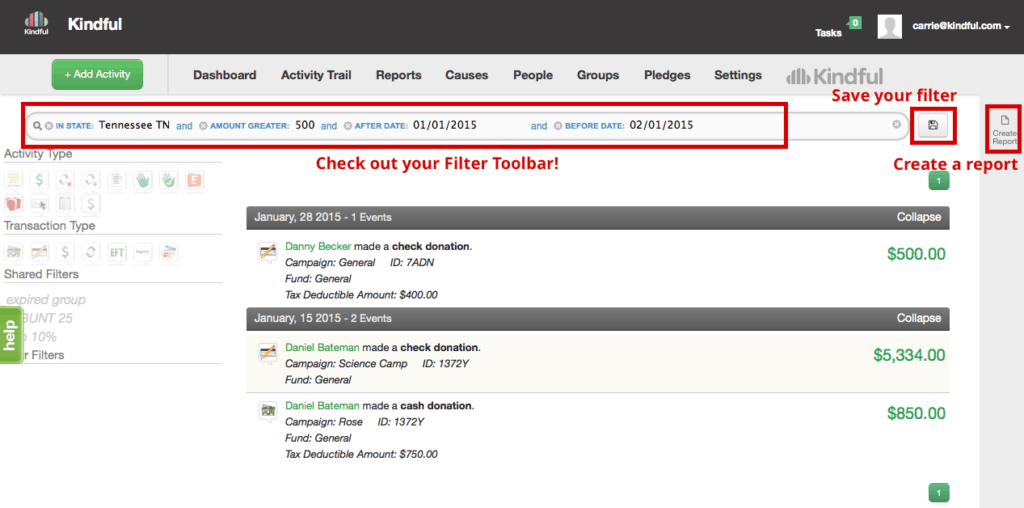
Gone are the days of wasting time sifting through unnecessary columns and deleting everything you didn't need in the first place. When you create a report in Kindful's fundraising database, you can easily choose the info you want to show, and keep everything else out. And just like your filtering, it all happens on one screen. When you click on the "Create Report" icon, a pop-up screen will prompt you to pick only the information you want to see… and it even let's you choose to view your report in portrait or landscape format!
Once you build and save your filter, you can pull the same report whenever you need it. And you can do it in about a minute. From your report, just save your filter as a custom Report Template. Then when you need to re-pull that same report, head on over to your Report Tab, find your saved report and create it. Use all that extra time wisely!
Your boss wants a report of all donors in Tennessee who gave more than $500 after January 1 but before February 1. And he wants it in 15 minutes. Here's what you do:
(How long did it take you to create that? 5 minutes? We'll let you figure out how to use those extra 10.
Are you ready to experience the power and ease of Kindful's intuitive reporting? Get in touch today to schedule a demo with one of our friendly expert sales consultants.